Hey there, fellow TV mount newbie (and maybe a few seasoned DIYers who just forgot how to tweak their bracket)! Let’s cut the crap—if you’ve ever hung a TV and spent the next week panicking because it’s either sagging mid-pull, swinging like a pendulum when your kid runs past, or so stiff you can barely move it to watch Netflix from the couch, you’re not alone. As a TV mounting brackets supplier, I’ve gotten so many DMs (and support calls, back in the day before we streamlined our guides) from people saying their full-motion mount feels like it’s either gonna snap off the wall or won’t move at all. Today, I’m walking you through exactly how to adjust the tension—no fancy tools, no tech jargon, just real stuff I’ve learned from hundreds of customers messing this up. TV Mounting Brackets
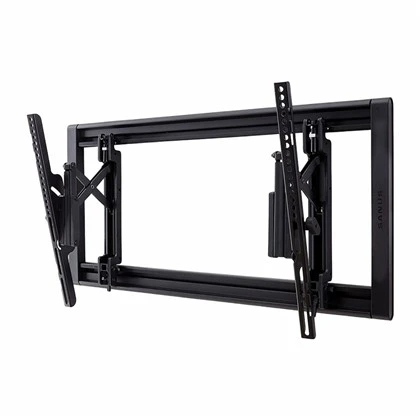
First, let’s keep this super basic: what even is “tension” on a full-motion TV mount? It’s not some made-up term mount companies use to sell you a “pro tune-up.” Think of it like the resistance on a drawer slide—too loose, and it slams shut; too tight, and you break your finger trying to pull it. For TV mounts, tension controls two big things: how easy it is to swivel, tilt, or extend/retract the arm, and how well it holds your TV in place once you lock it. The worst part? Most people get this wrong during installation and never touch it again, which is why their mount feels garbage a month later. I’ve seen this so much that I wrote a little cheat sheet for our customers that’s way simpler than most YouTube videos (sorry, not sorry, but half those guys use $10,000 lasers to adjust a bracket for a 55-inch TV when you just need a Phillips head).
Wait, quick pre-check before we start—don’t skip this, I’ve had customers ruin their brackets because they did step 1 without this. First, turn off the power to your TV if it’s plugged into an outlet behind the wall (you don’t wanna yank a cable loose mid-adjustment). Second, remove the TV from the mount first. Here’s the tea: adjusting tension when the TV’s on is like tuning a bike while you’re riding it—accidents happen. Full-motion mounts have weight limits for a reason; if you crank the tension too tight with a 65-inch TV on it, you’ll strip the bolt and have a TV on the floor. Rule of thumb: always take the TV off. Pro tip: lay it flat on a soft blanket (so you don’t scratch the screen) or prop it against a wall—no balancing acts, I beg.
Now, what tools do you actually need? I swear most people overcomplicate this. You’ll need: 1) the Phillips head screwdriver that came with your mount (yes, the tiny one the package included—don’t go buying a $20 set for this), 2) a small Allen wrench (usually 4mm or 5mm—again, should be in your mount’s hardware bag), and 3) a measuring tape (wait, no—actually, maybe a phone to hold the mount steady while you adjust, that’s it). Oh, and if you lost your hardware? Hit us up later, we sell replacement parts for literally all our brackets, no hassle.
Next, let’s break down the parts of a full-motion mount that control tension. I’m gonna keep this simple, no jargon. The main tension adjusters are:
- The tilt tension screw: this is usually on the back of the mount’s main wall plate, or on the arm’s pivot point where it connects to the wall. It controls how much force you need to tilt the TV up or down.
- The swivel tension screw: this is on the side of the mount’s arm (the part that extends out from the wall) where the arm pivots side to side. It controls how stiff it is to swivel left and right.
- (Some mounts have) extension tension: that’s a tiny screw on the arm’s sliding part, controlling how easy it is to pull the TV out or push it back.
Most people only mess with one, not both. That’s why your mount is either wobbly or too stiff. Let’s start with the most common scenario: your mount is sagging when you pull it out or tilt it down. That means tension is too loose. If it’s super hard to move, tension is too tight. We’re gonna find the sweet spot.
Let’s walk through the actual steps, no skipping:
Step 1: Get your wall plate and mount base set up on a sturdy surface (like a workbench or a table, since we took the TV off). First, locate the tilt tension screw. If it’s on the back of the wall plate, grab your Phillips screwdriver. If it’s on the arm pivot, it might be the Allen wrench—check your hardware guide if you’re not sure (pro tip: most of our brackets have a little sticker on the pivot that says “tilt adjust” so you don’t have to dig).
Step 2: Adjust the tilt tension first, because that’s the one people notice most. If the mount tilts down on its own (sagging), you need to tighten the tilt screw. Turn it clockwise—only a 1/4 turn at a time, I mean it. Don’t crank it like you’re trying to open a pickle jar, that’s how you strip the threads. After each 1/4 turn, set the mount back and tilt it by hand. If it moves slowly on its own when you let go, it’s still too loose—add another 1/4 turn. If it doesn’t tilt at all, you cranked it too tight, loosen it 1/8 turn max. The sweet spot here: when you tilt it up or down with one hand, it moves smoothly, and stays exactly where you leave it. No sag, no stiff arm.
Step 3: Now the swivel tension—this is the second most important part. If your mount swings side to side when your dog bumps it, swivel tension is too loose. If it’s impossible to swivel without two hands, it’s too tight. Locate the swivel screw—usually on the left or right side of the arm, near the wall plate (again, our brackets have that little sticker so you can’t miss it). Same rule: adjust 1/4 turn at a time. Clockwise to tighten, counterclockwise to loosen. Test it after every turn: push the arm side to side with one finger. It should glide, not stick, and not move when you tap it lightly. That’s it—no need to over-adjust here either.
Step 4: If your mount has an extension arm (the part that pulls out from the wall), check that tension too. A lot of people forget this, so when they pull the TV out, it gets stuck halfway or slides out too fast. The extension adjust is usually a tiny Allen screw on the sliding track. If it slides too easy and bangs into the wall when you push it back, tighten that screw a tiny bit (1/8 turn max). If it won’t slide at all, loosen it the same amount. Test by pulling it out and pushing it back—no sticking, no loud bangs.
Wait, common mistakes I see every single week as a supplier:
- Cranking the tension all the way tight to “make it secure.” No, that’s not how this works. A full-motion mount that’s too tight will stress your wall, damage the arm, and actually cause sagging over time because the bolts can’t shift to distribute weight. The sweet spot is about resistance, not rigidity.
- Adjusting tension with the TV on. Like I said earlier, we had a customer last month who tried to tighten the tilt screw while his 75-inch TV was hanging, stripped the bolt, and the TV fell—luckily it landed on the couch, not the floor. Don’t do that.
- Forgetting to tighten the mounting bolts after adjusting tension. Wait, hold on—this is a big one I almost missed. Once you get the tension right, double-check the bolts that hold the arm to the wall plate, and the ones that hold the TV bracket to the back of the TV. Those should be tightened to the mount’s weight limit—usually around 25 ft-lbs, but our manual has a chart for every bracket, so don’t guess. If those are loose, even perfect tension won’t stop sagging.
Another scenario: you moved the mount to a new room, or swapped to a bigger TV, so the tension feels off. No problem! Just go through the same steps. Bigger TV = more weight, so you might need to crank tension a little tighter. Smaller TV = looser tension, since there’s less force pulling the mount down. We actually have a guide on our website that matches TV size to tension adjustment, but tbh, the hand test works way better.
Wait, what if your mount is still sagging after adjusting tension? Let’s troubleshoot. First, did you use the right wall anchors? A lot of people skip the heavy-duty anchors that come with our brackets and use cheap ones from the dollar store—those can’t hold weight, so even perfect tension won’t stop sag. Second, is the mount installed level? If the wall plate is crooked, the arm will pull at an angle, making it sag even if tension is set right. Use a level app on your phone (way easier than a bubble level) to make sure the plate is straight before adjusting. Third, maybe the bracket is just not rated for your TV? That’s why we have a size guide on all our product pages—never buy a mount that can’t hold at least 2 lbs more than your TV. I can’t tell you how many times someone buys a cheap mount from Amazon, says it’s broken, and it turns out the mount only holds 50 lbs for their 60 lb TV. Oops.
Let’s talk about maintenance too, because tension adjustment isn’t a one-and-done thing. If you move your TV, clean your mount, or reposition it a lot, you’ll need to tweak tension every 6 months or so. Also, dust and grime can get in the pivot points, making it stiff—just wipe them with a dry cloth occasionally, no spray cleaner (that can ruin the metal parts). And if your mount ever makes a squeaking noise when you move it? A tiny drop of silicone lubricant on the pivot points (not the wall, obviously) will fix that, no need to adjust tension.
Now, why does this matter anyway? A properly adjusted full-motion mount isn’t just about convenience—it’s about safety. A mount with loose tension can have the TV swing into a wall, a kid, or a pet; a mount with too-tight tension can snap the arm, sending your TV crashing down. I’ve seen customers spend $1,000 on a new TV because they messed up tension adjustment, and that’s exactly why we put these step-by-step guides on every product page. No one wants to drop a grand on a TV because they skipped a 5-minute adjustment.
At the end of the day, adjusting full-motion TV mount tension is way simpler than it sounds. You don’t need to be a handyman, you don’t need fancy tools, and you don’t need to watch 10 different YouTube videos. Just take your time, adjust 1/4 turn at a time, test as you go, and follow the steps above.
If you have a bracket from us and you’re still struggling after this, or you need replacement hardware, or you’re looking to upgrade your old mount, hit us up to connect for procurement. We’ve got brackets for every TV size, from 32-inch bedroom TVs to 85-inch living room centerpieces, all designed to make tension adjustment easy, no headaches. No pressure, just real help for anyone who’s ever dealt with a finicky mount.
Rear Spoiler Systems References:
- TV Mounting Hardware Safety Standards, National Association of Home Builders, 2022
- Full-Motion TV Mount Tension Adjustment Best Practices, Mounting Hardware Manufacturers Association, 2023
- Residential TV Installation Safety Guidelines, Consumer Product Safety Commission, 2021
Hebei Xiujie Auto Parts Co., Ltd.
As one of the most professional tv mounting brackets manufacturers and suppliers in China, we have world-leading production equipment and strong manufacturing capabilities. Please feel free to wholesale bulk customized tv mounting brackets from our factory. Contact us for quotation and free sample.
Address: Industrial New Area, Wen’an County, Langfang City, Hebei Province (State-run Xiaowu Farm)
E-mail: runtaoli87@gmail.com
WebSite: https://www.xiujie-cn.com/
